Plus custom device

A comprehensive LMS platform design & development

EasyGoLMS: Transforming Course Creation from Overwhelming to Effortless

Project Type
End-to-end app design, UX case study
ROLE
UX designer
Industry
Education Technology, Online Learning
TOOLS
Figma, chatGPT

Introduction

Over 75% of new course creators lose momentum before publishing their first course. While many creators have something valuable to teach, they often hit a wall before their course ever goes live.

Most platforms expect users to come in with a fully formed plan, ready to tackle structure, pricing, and publishing — but that’s rarely the reality.

Instead of gaining momentum, many aspiring instructors find themselves stalled. Faced with blank dashboards, too many choices, and little clarity on how to begin, their ideas remain ideas — never taking form as a real course.

Research shows that without early guidance and a clear starting point, course creation often ends before it truly begins.

The experience was designed to remove friction, build confidence, and provide support from the very first step of the instructor’s journey.
Design Process

From user insights to concrete solutions, exploring how to transform course creation from overwhelming to effortless.

The Design Process:

1

Research

Understand user needs and identify pain points.

2

Define

Synthesize insights into clear problem statements.

3

Ideate

Generate and brainstorm creative solutions.

4

Prototype

Build and test interactive solutions rapidly.

5

Validate

Test with users and refine based on feedback.

Gal Hadad

Research & Discovery

Through competitive analysis, user research, and AI-assisted insights, clear patterns emerged about where instructors lose momentum and why

Before any design decisions were made, it was essential to gain a deep understanding of the first-time instructor experience. What truly holds them back? Where does momentum fade?

A mix of competitive analysis, AI-assisted research, and user simulation was used to uncover the key friction points in the course creation journey.

This approach highlighted both the gaps in existing platforms and the unmet needs of aspiring instructors.

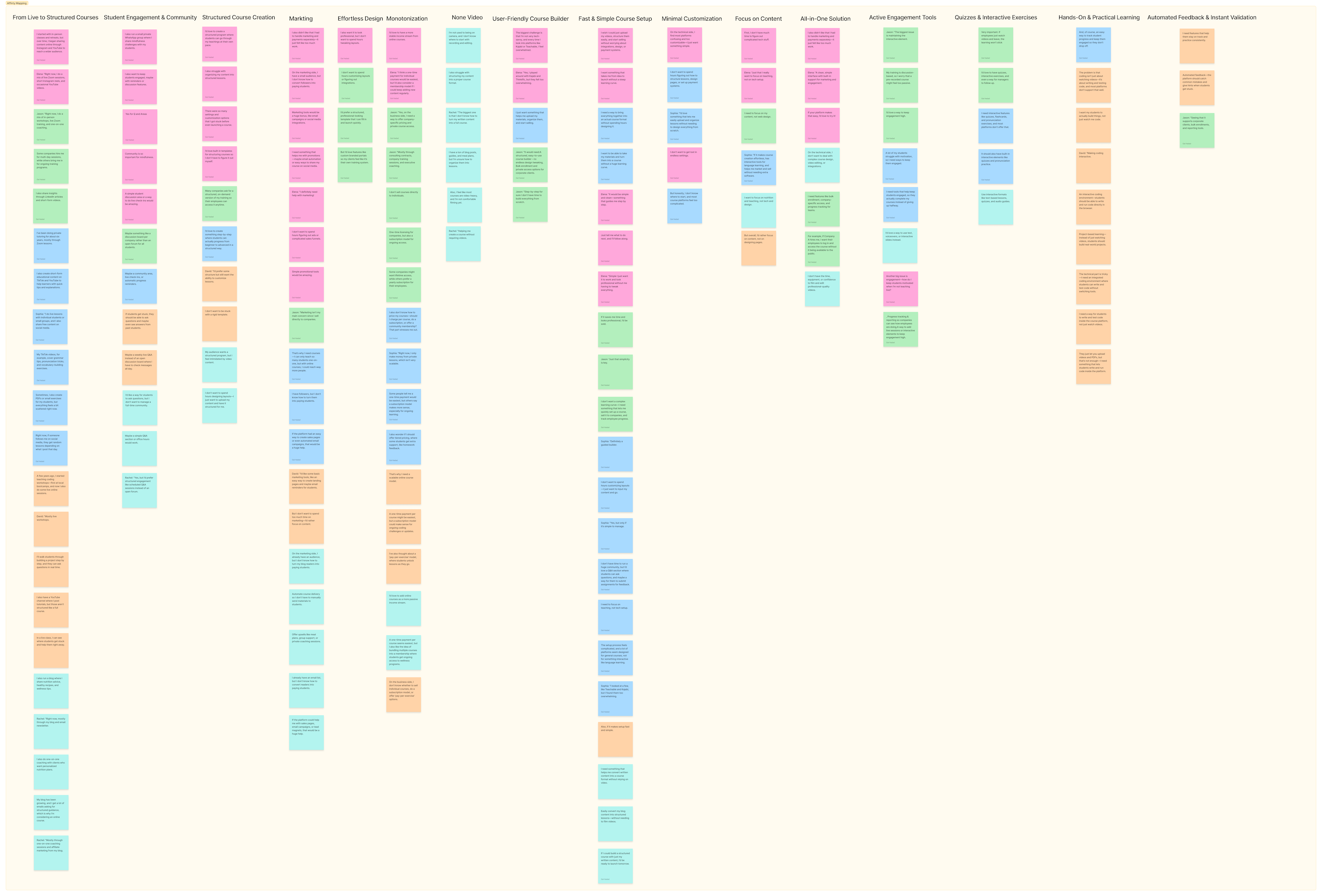
Dozens of quotes, frustrations, and desires shared by real instructors were gathered and organized into an affinity map, surfacing recurring themes and opportunities.

A collection of real user needs, grouped into actionable themes — the foundation for building a product that feels truly supportive, from first click to final launch.

Understanding Users

Understanding the instructor through research, empathy, and strategic planning.

Before any design decisions were made, it was essential to gain a deep understanding of the instructor experience. Through personas, journey mapping, and empathy exercises, the research revealed that the biggest barriers weren’t technical—they were emotional. Fear of failure, uncertainty about structure, and lack of confidence held creators back more than any missing feature. These insights became the design compass

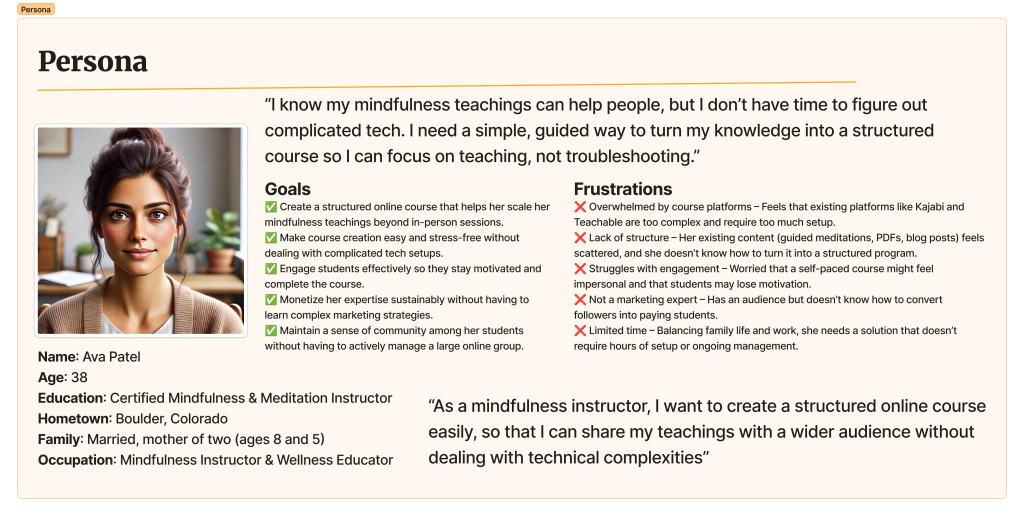
Primary Persona

Meet Ava Patel, a certified mindfulness instructor who wants to scale her teachings online but struggles with technical complexity. This persona represents our primary target user based on research insights.

Key Characteristics:

  • 38 years old, married with two children
  • Certified Mindfulness & Meditation Instructor
  • Wants to reach wider audience online
  • Struggles with technical setup and complexity
  • Values simplicity and professional appearance

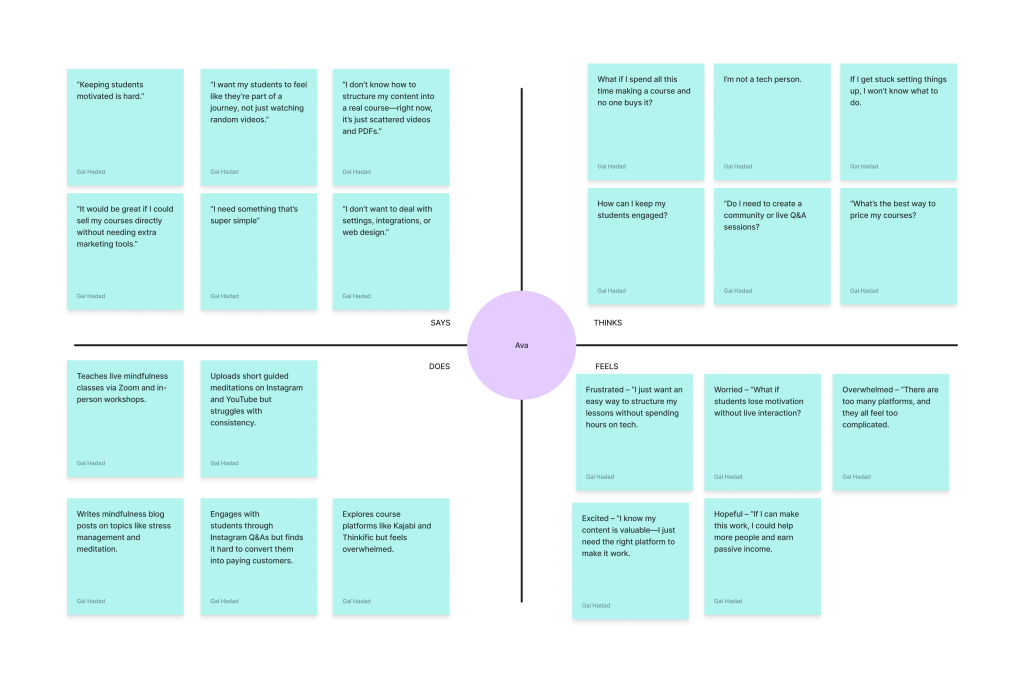
Empathy Map

A deeper dive into what instructors think, feel, see, and do throughout their course creation journey. This revealed the emotional landscape beyond surface-level frustrations.

Key Insights:

  • Fear of technology and appearing unprofessional
  • Excitement about sharing knowledge vs. tech anxiety
  • Pressure to create perfect content immediately
  • Desire for guidance and step-by-step support
  • Hope for passive income and business growth

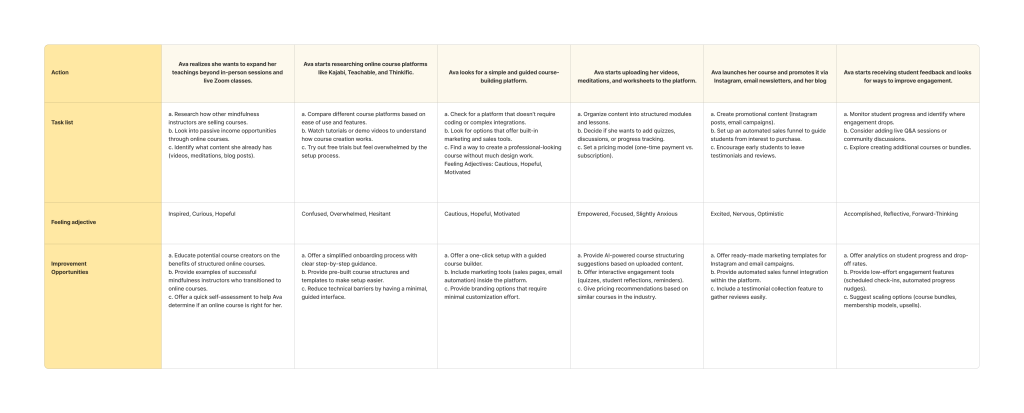
User Journey Map

A detailed mapping of the instructor’s complete journey from initial idea to published course, identifying critical friction points and opportunities for support.

Journey Stages:

  • Initial motivation and course idea formation
  • Platform research and selection process
  • Content planning and structure creation
  • Technical setup and content upload
  • Launch preparation and marketing

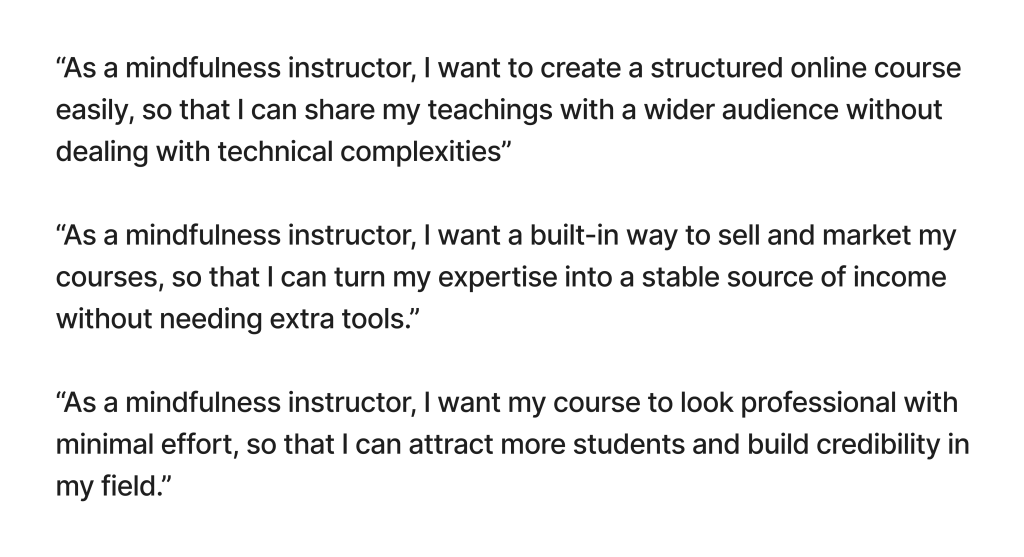
User Stories

Specific scenarios and requirements from the instructor’s perspective, helping prioritize features and functionality based on real user needs and goals.

Story Categories:

  • Course creation and content management
  • Student engagement and progress tracking
  • Marketing and sales functionality
  • Analytics and performance insights
  • Technical setup and customization

What's Holding Instructors Back?

For first-time course creators, the biggest blockers aren't what to teach — it's everything around it. From confusing tech to unclear sales paths, the pain points stack up quickly.

When examining why so many courses never launch, the research uncovered a pattern of interconnected challenges. These aren’t just minor inconveniences—they’re fundamental barriers that transform enthusiasm into abandonment. Here are the four key obstacles that emerged from the research:

Time Drain

Designing, writing, recording — it's all too time-consuming without guidance.

Tech Fatigue

Too many settings, too much setup — not enough clarity.

Drop-off Doubts

Worrying students will lose interest and never complete the course.

Sales Struggles

No clear way to convert followers into paying students.

The HMW Journey

Turning instructor challenges into design opportunities

Stemming from our research and the identified instructor pain points, we then used ‘How Might We’ (HMW) questions to reframe these challenges as actionable design opportunities. This process was key to our ideation, and the table below shows how each core challenge evolved into an HMW question that guided our design exploration.

Pain Point HMW Question Proposed Solution
🤯Overwhelming complexity HMW Make course creation intuitive and effortless? Step-by-step guided flow
📚Scattered content everywhere HMW Help instructors organize content into structured courses? AI-powered curriculum builder
💻Tech barriers stopping progress HMW Eliminate technical barriers for non-tech-savvy instructors? Simplified, intuitive interface
💲Pricing paralysis HMW Help instructors confidently choose the best pricing? Smart pricing recommendations
Takes forever to launch HMW Reduce the time to build a professional course? Templates & AI assistance
📉Student disengagement & drop-off HMW Boost student engagement and course completion rates? Interactive elements, progress tracking, community
📢Uncertainty in marketing & selling HMW Simplify course marketing and sales for instructors? Built-in sales tools, marketing guidance

Tracking Key Performance

Quantifying the impact of design on instructor and student engagement

To evaluate the effectiveness of the design solutions and ensure they meet the project’s goals, the following Key Performance Indicators (KPIs) will be tracked. These metrics are chosen to reflect both instructor success and student engagement on the EasyGoLMS platform.

KPI Metric Description & Goal How to Measure (Example)
🎓Course Completion Rate Why: Indicates student satisfaction, course value, and effective learning experience.
Goal: Increase by X%.
Percentage of enrolled students who successfully complete a course.
Time to First Course Launch Why: Measures platform efficiency and ease of use for new instructors.
Goal: Reduce average time by Y%.
Average time from instructor sign-up to publishing their first course.
👍Student Engagement Score Why: Reflects course quality, interactivity, and student involvement.
Goal: Improve overall score by Z points.
Composite score based on activity (e.g., lesson views, quiz attempts, forum participation).
💰Instructor Revenue Growth Why: Shows the platform's ability to help instructors successfully monetize their expertise.
Goal: Increase average monthly revenue per active instructor.
Average monthly earnings per instructor; total platform revenue from course sales.
🛠️Reduction in Support Tickets Why: Suggests improved usability and clarity of the platform, reducing friction points.
Goal: Decrease tickets related to course setup by W%.
Number of support requests related to common course creation tasks.

Exploring Ideas with Sketches

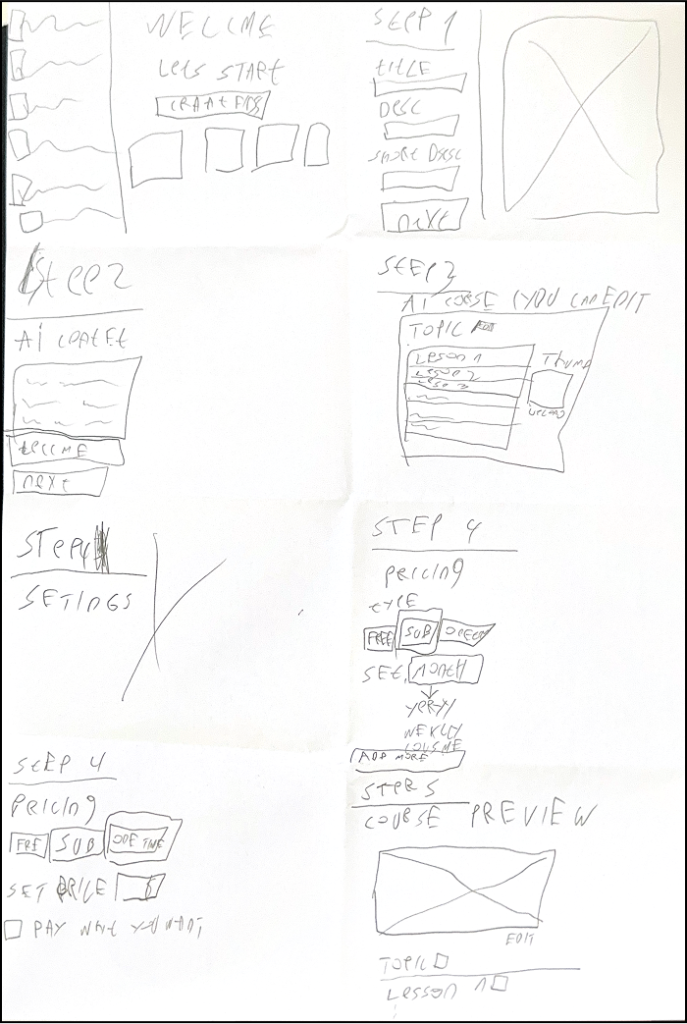
Before diving into pixels and components, we started with pen and paper.

Through a mix of Crazy 8s and sketchstorming, we explored different ways an instructor might flow through the course creation journey. These rough sketches weren’t about perfection — they were about possibilities.

The goal: visualize how we could reduce friction, offer helpful nudges, and give creators a sense of structure without overwhelming them.

Crazy 8s helped us quickly explore different flows and layouts for course creation.

The Initial Design Prototype

The first prototype focuses on simplifying the course creation process, helping instructors feel confident and empowered from start to finish.

This prototype emphasizes simplicity, AI support, and structured steps to help instructors quickly create and launch their courses with ease.

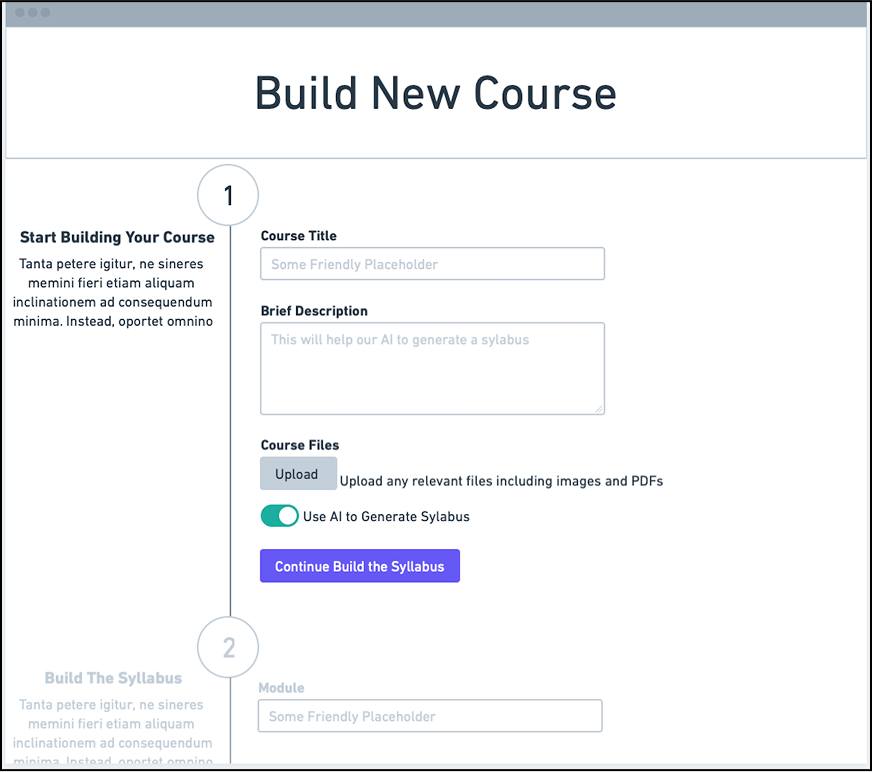
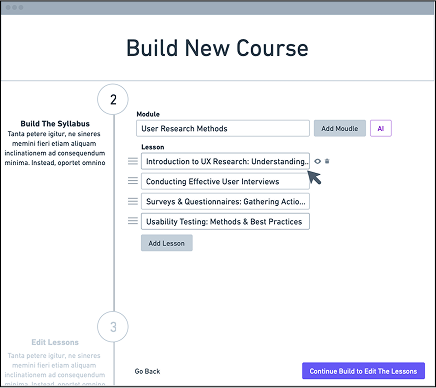
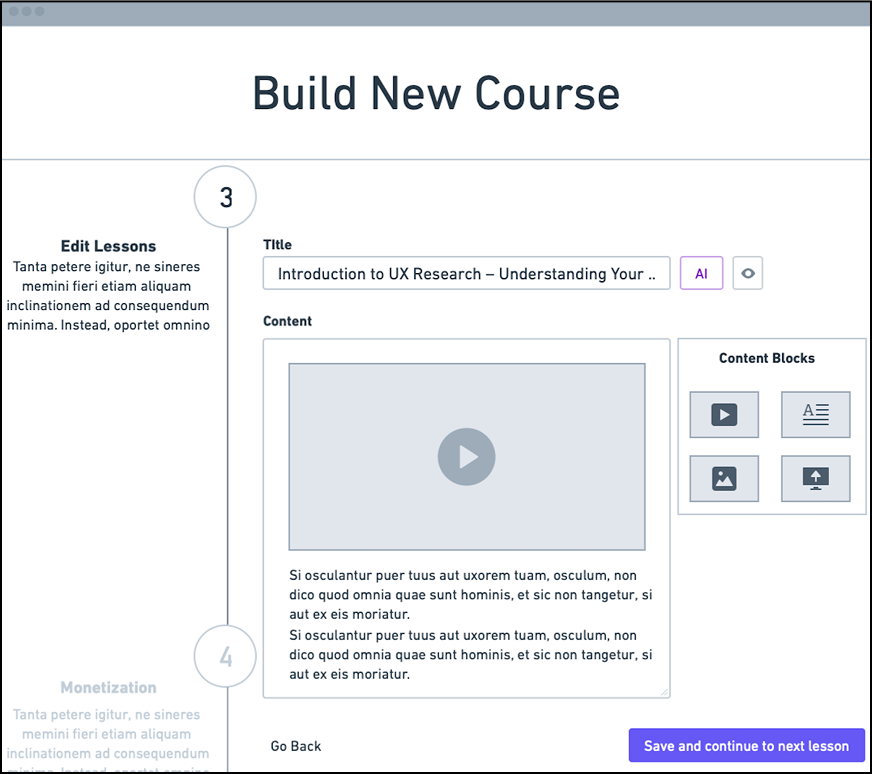
After identifying the biggest blockers for first-time instructors — tech fatigue, unclear structure, and lack of confidence — our goal was to design an experience that felt approachable, intuitive, and progress-driven. These final screens reflect that vision: a course creation flow that guides, supports, and empowers instructors at every step, from sign-up to publish.

Each screen was crafted with clarity, simplicity, and encouragement in mind — minimizing complexity while offering just enough flexibility to feel personal and professional.

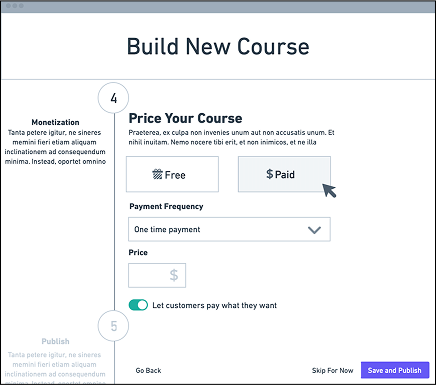
Monetization: This step provides simple pricing options, allowing instructors to set free or paid courses with flexible payment options like one-time fees or subscriptions.
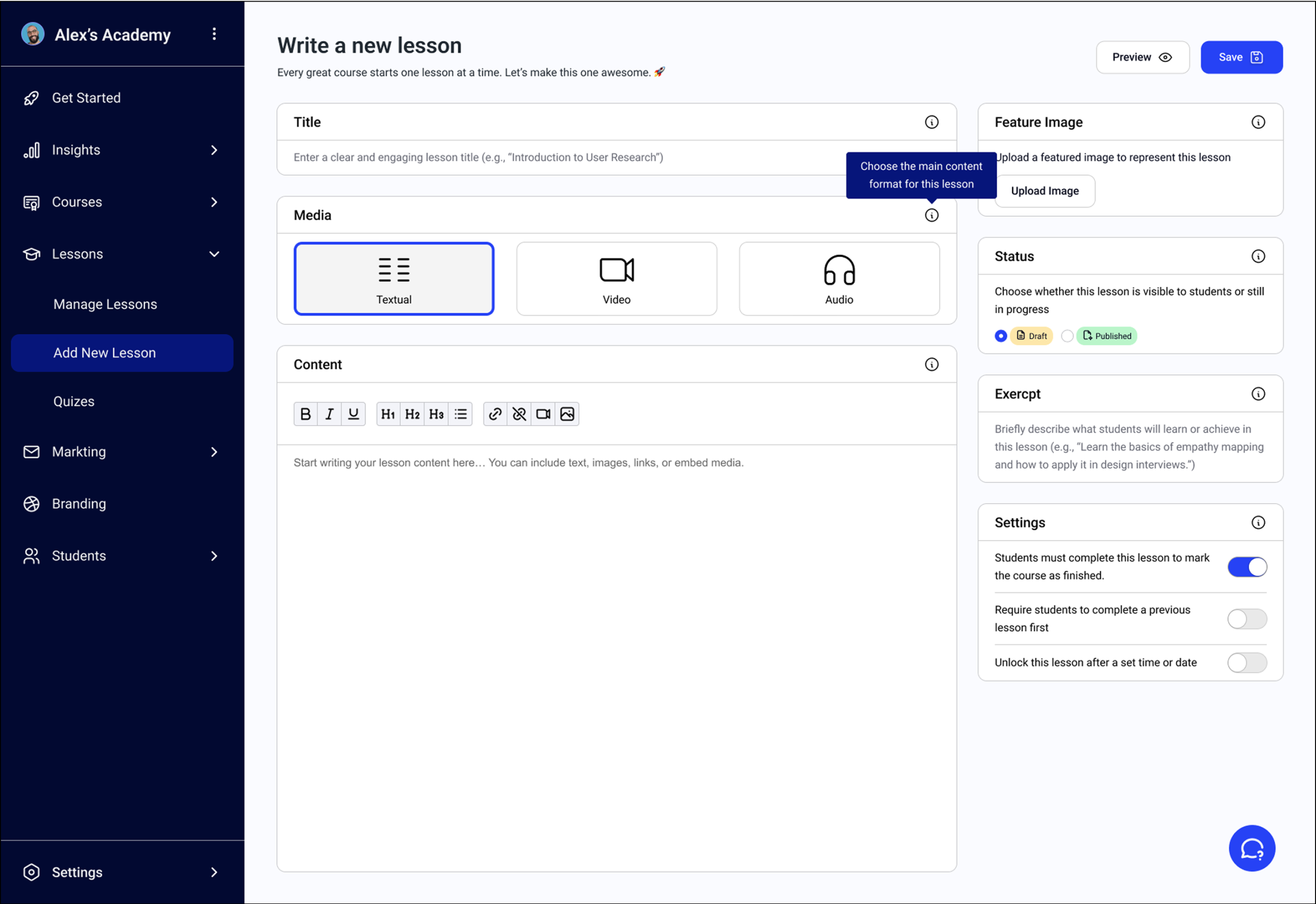
Editing Lessons: Instructors can add and organize lesson content using content blocks for text, images, and videos, all while receiving AI-driven content suggestions to improve the lesson materials.
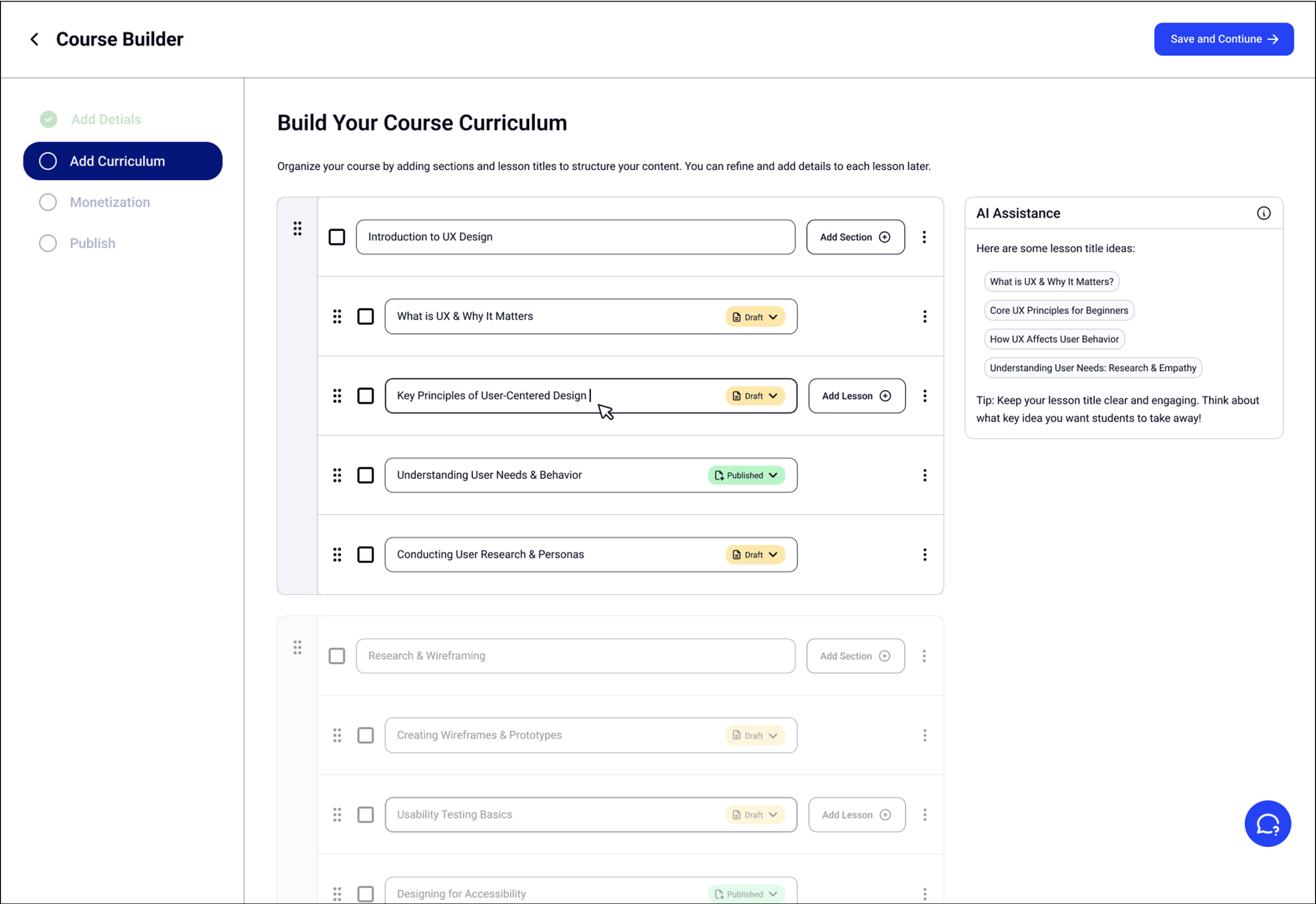
Building the Syllabus: In this step, instructors structure the course by adding modules and lessons, with AI assistance for topic suggestions, streamlining content creation.
Course Setup: Instructors begin by entering basic details like the course title and description. They can upload files and use AI to generate a syllabus, setting up a clear foundation.

Solution Showcase

Presenting the core screens and user experience of EasyGoLMS

After a comprehensive process of research, ideation, and iterative refinement guided by our HMW questions, we arrived at the final design for EasyGoLMS. The following screens showcase the core user experience, demonstrating how we translated insights into an intuitive and empowering platform for course creators. We focused on creating a seamless journey that addresses the previously identified pain points, ensuring that every interaction contributes to a feeling of clarity, confidence, and control for the instructor.

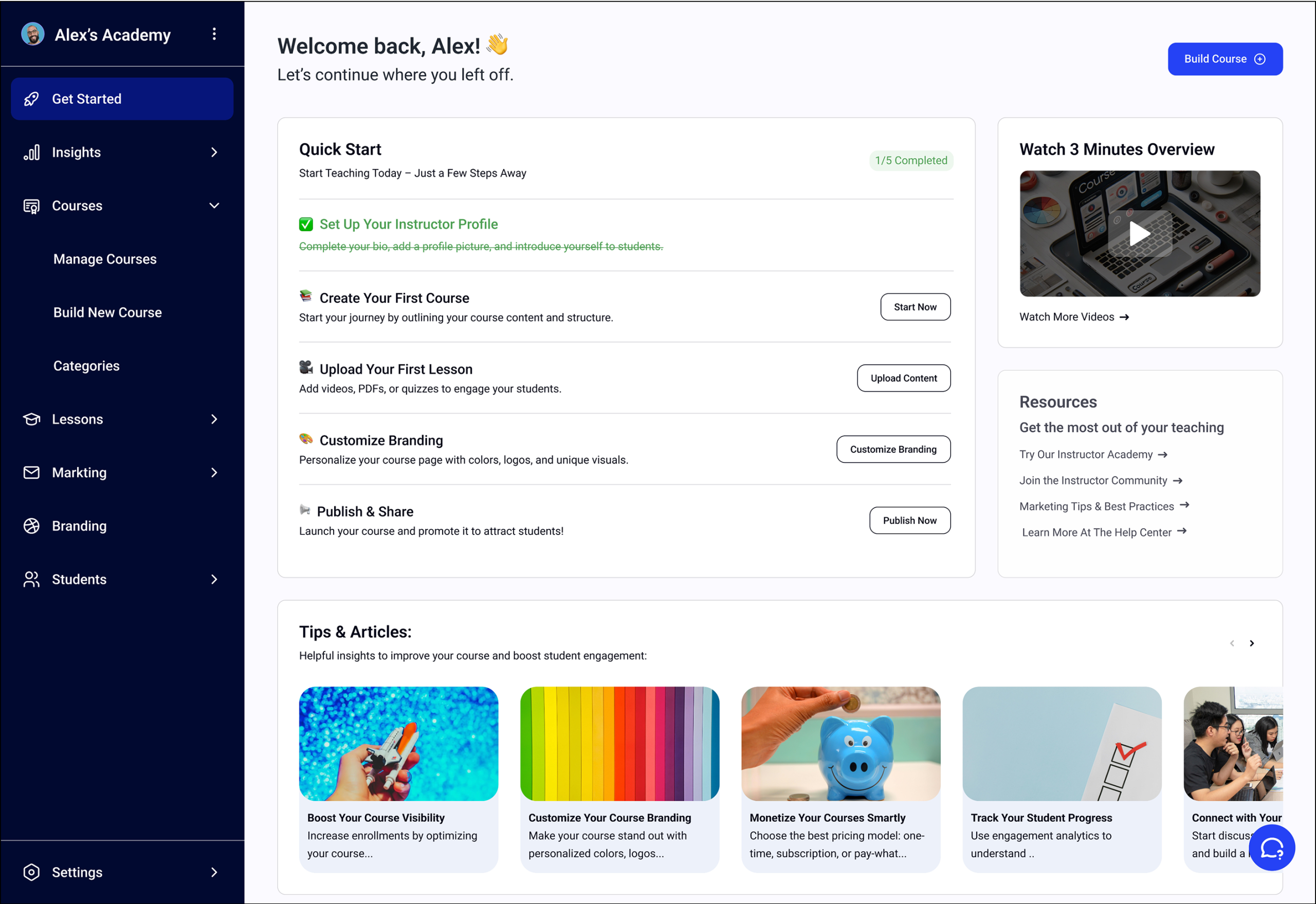
Welcome Dashboard: Reduce Friction from the Start

This dashboard greets instructors with a friendly, step-by-step checklist that breaks down the course creation process. It answers the common “Where do I start?” question by turning a big goal into manageable actions. It also offers quick access to resources, tutorials, and marketing tips — minimizing overwhelm and maximizing clarity.

A guided starting point that breaks the process into small, clear steps — helping instructors overcome blank-page anxiety.

Curriculum Builder: Structure Without the Stress

This dashboard greets instructors with a friendly, step-by-step checklist that breaks down the course creation process. It answers the common “Where do I start?” question by turning a big goal into manageable actions. It also offers quick access to resources, tutorials, and marketing tips — minimizing overwhelm and maximizing clarity.

An intuitive, drag-and-drop layout with smart AI suggestions to help structure courses faster and with more confidence.

Lesson Editor: Flexible, Simple, and Focused on Content

This screen gives instructors a distraction-free way to write and format their lessons. They can choose between text, video, or audio as the primary format, depending on what’s most comfortable. Optional settings like prerequisites or unlock timing offer structure without overcomplicating the process.

A focused editor that lets instructors choose their preferred format and create lessons without tech distractions.

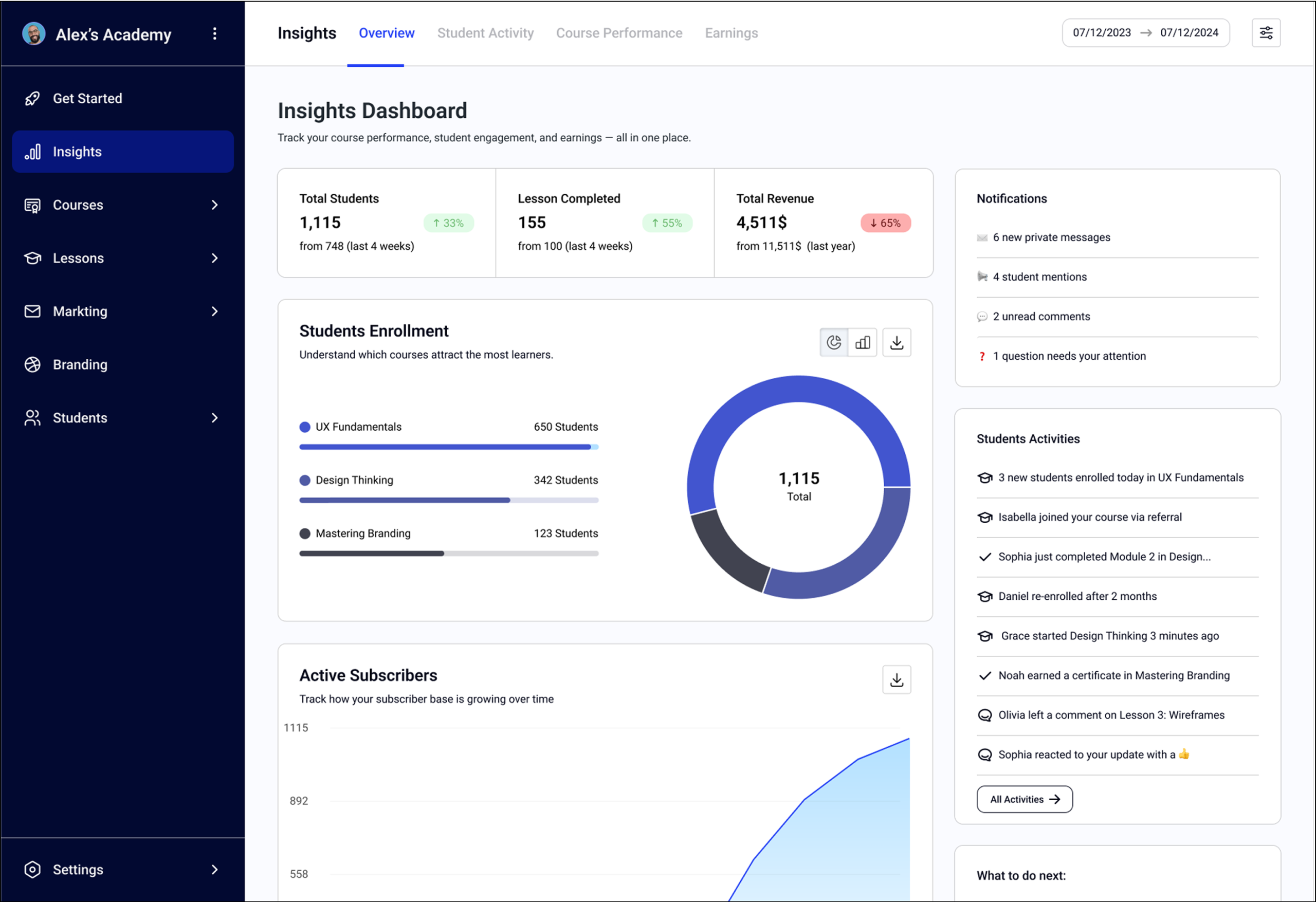
Insights Dashboard

This dashboard helps instructors stay motivated by showing real-time course performance. Instead of abstract analytics, we focused on what matters: student activity, engagement patterns, and earnings. Clear visualizations make it easy to spot trends, track progress, and understand impact.

Real-time performance metrics designed to boost instructor motivation by highlighting what’s working and where to improve.