A mindful productivity app for intentional daily planning
Stay Grounded: Designing a Mindful Approach to Daily Planning
Introduction
Over 70% of people using traditional to-do apps report feeling more stressed at the end of planning than they did before opening the app.
Most task apps are built for getting things done fast. But fast isn’t always what people need. This project explores a calmer way to plan the day—one that makes space for reflection, not just action. It helps users pause, write down what matters, and choose how to move through their day with intention. With gentle suggestions and a clean, focused interface, it supports a planning habit that feels more like a daily ritual than a checklist.
Exploring How People Plan, Prioritize, and Reflect
While these tools aim to boost productivity, they often create the opposite effect—overloading users with options, endless lists, and unrealistic expectations. Instead of feeling in control, people are left with task fatigue, decision paralysis, and a persistent sense of failure.
While these tools aim to boost productivity, they often create the opposite effect—overloading users with options, endless lists, and unrealistic expectations. Instead of feeling in control, people are left with task fatigue, decision paralysis, and a persistent sense of failure.
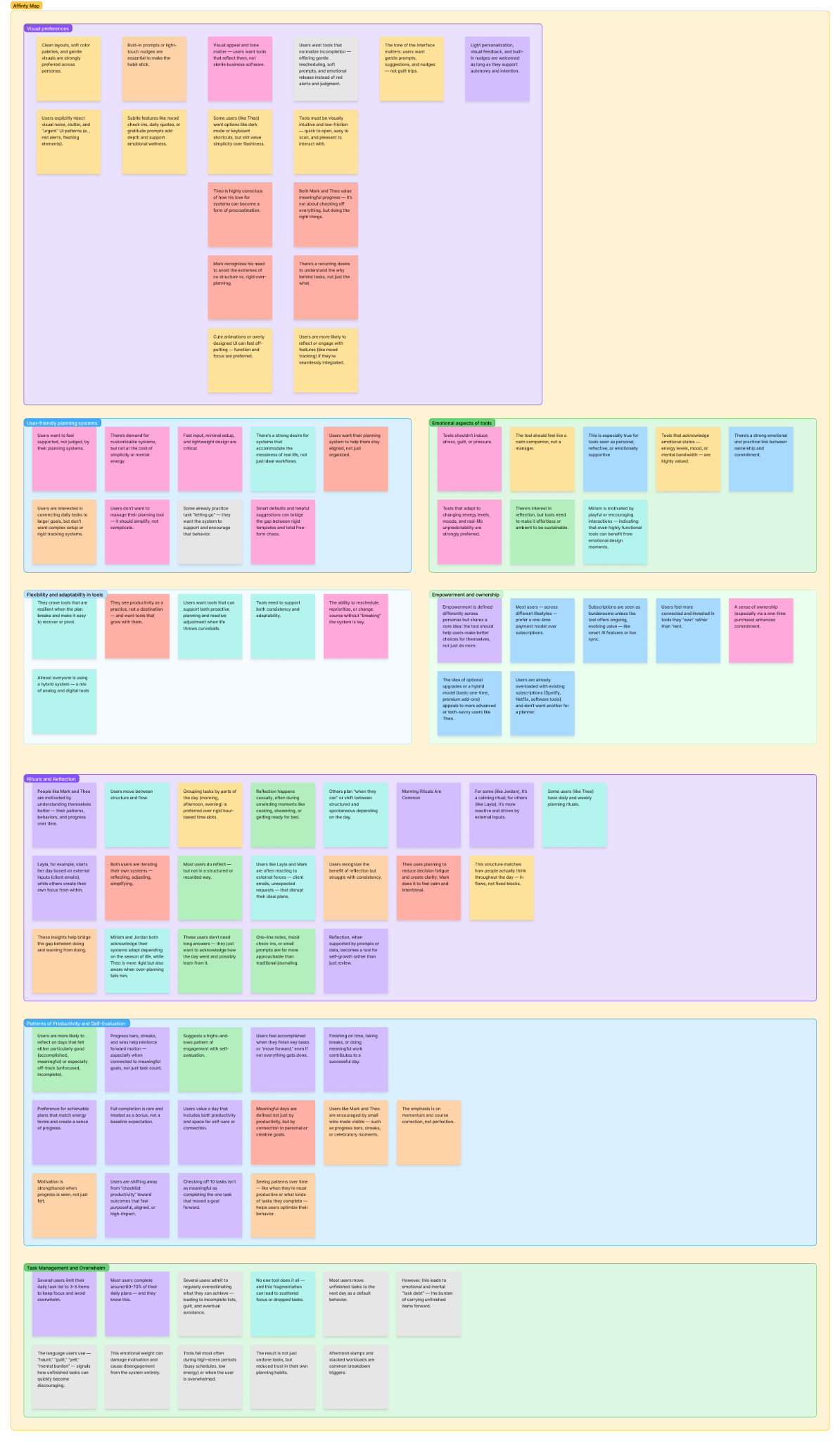
User behaviors, habits, and emotional responses around daily planning were explored through a combination of interviews, desk research, and pattern analysis. The goal was to understand how people approach planning, what tools they use, and where friction tends to appear. Key insights were synthesized into an affinity map, which helped surface recurring themes related to motivation, frustration, and daily rituals—providing a strong foundation for identifying pain points and guiding design decisions.
Visualizing Insights: Research Artifacts
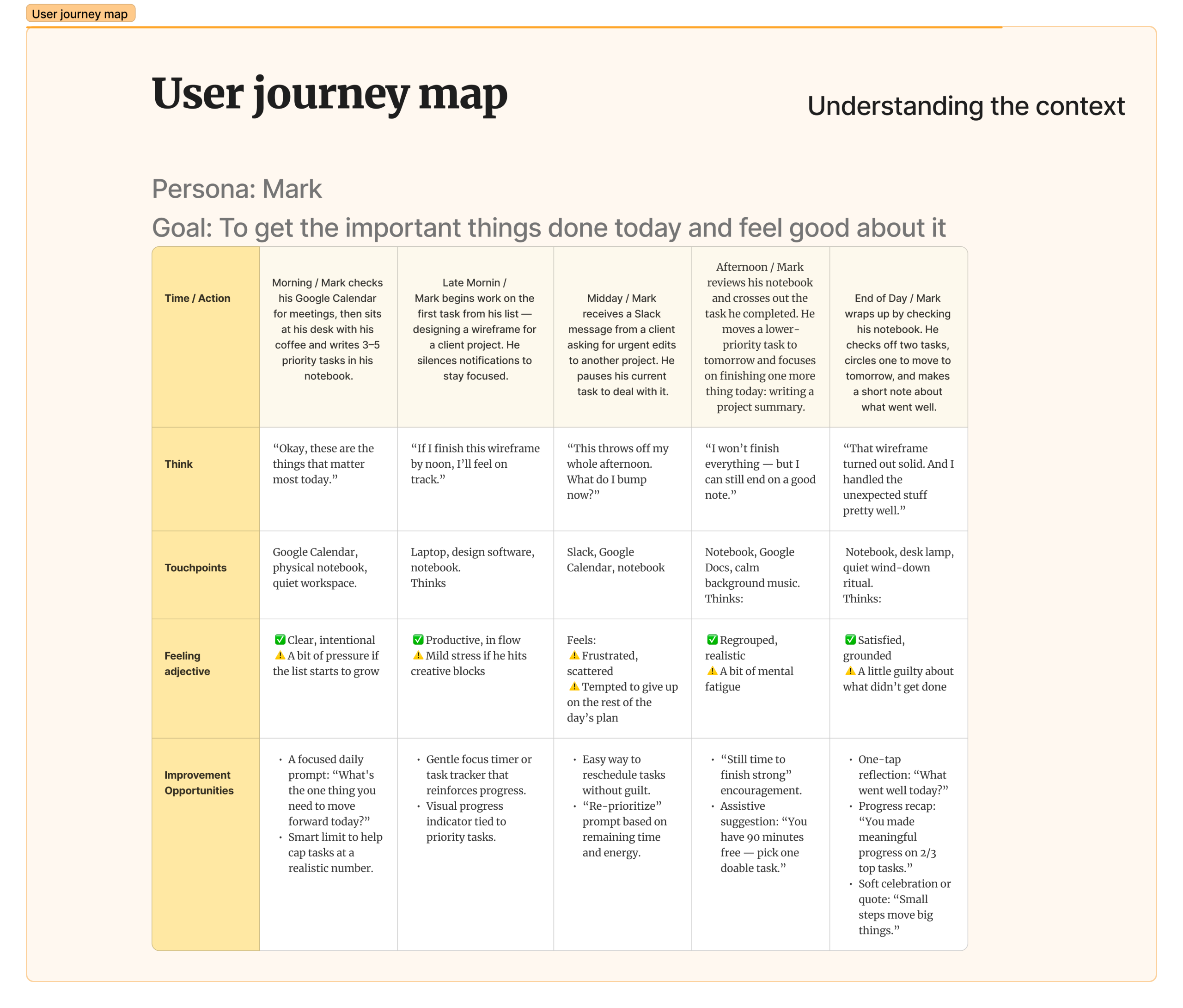
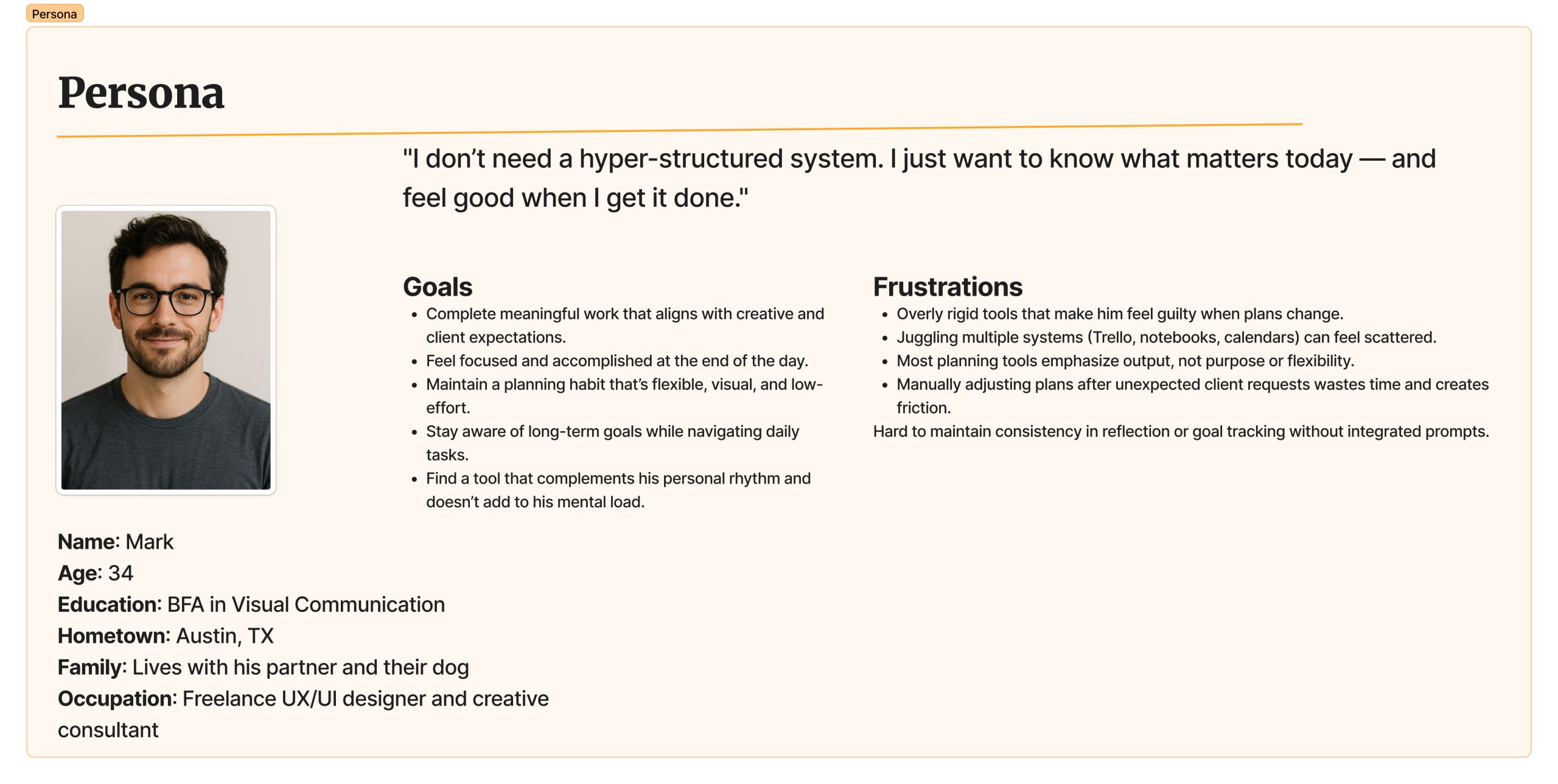
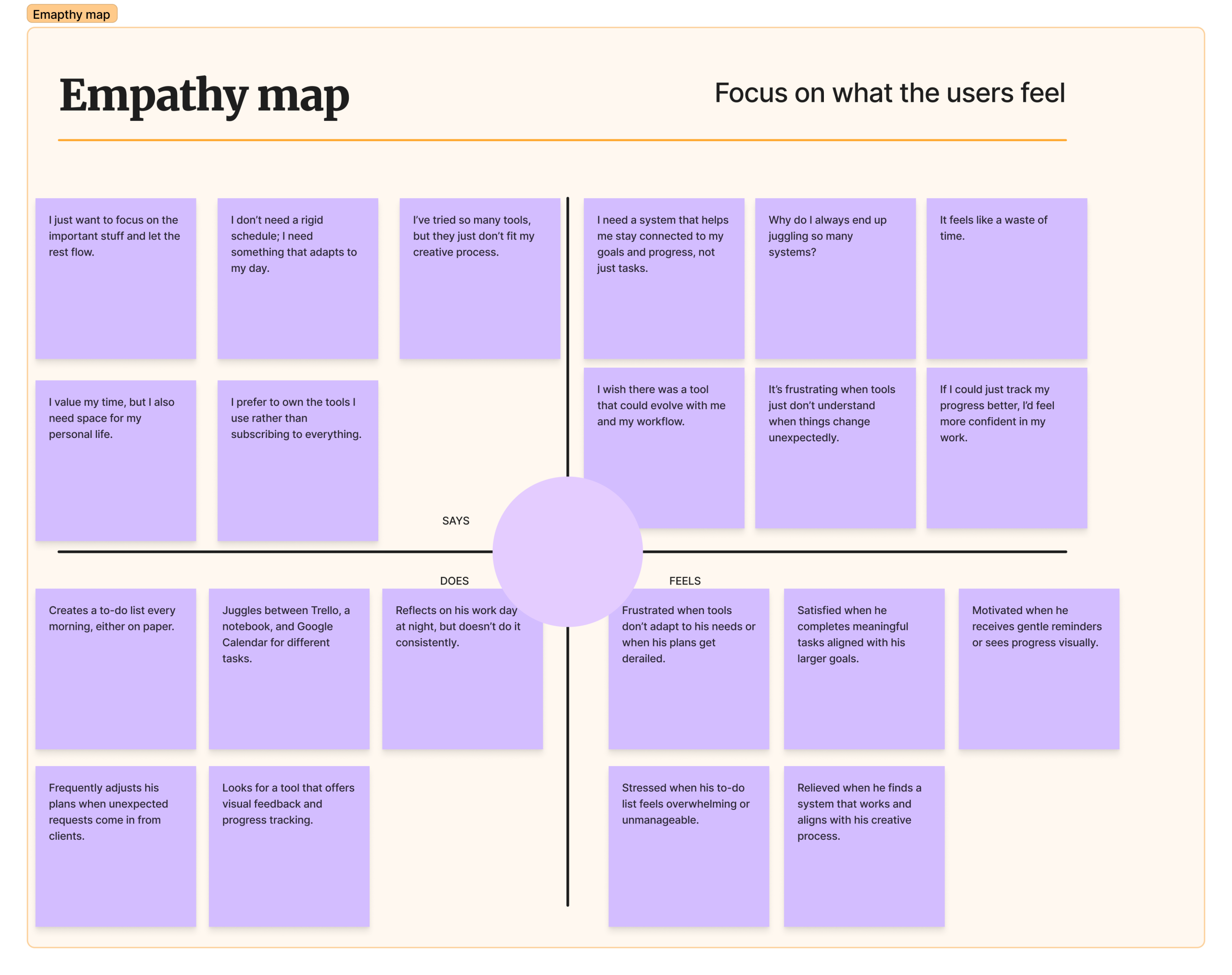
To better visualize these findings, a set of UX research artifacts was created—including an affinity map, empathy map, user journey, and persona. These tools helped frame the design opportunity and guided early concept development.
Understanding the Problem
During the research phase, over 20 recurring frustrations were identified across planning behaviors, tools, and emotional responses. These spanned issues like decision fatigue, emotional guilt from carry-over tasks, lack of reflection prompts, and disconnection between tasks and long-term goals.
To guide the design phase, the most critical pain points were synthesized into a focused set of “How Might We” (HMW) questions. These framed the challenges not just as problems—but as opportunities to design with empathy, clarity, and purpose.
Focused “How Might We” Questions:
Based on our user research and key insights, the following focused “How Might We” questions capture the core challenges we need to solve—guiding us toward intuitive, empathetic, and meaningful design solutions.
-
Regaining Control After Falling Behind
How might we help users easily reprioritize tasks and regain control after falling behind?
-
Reducing Emotional Guilt and Stress
How might we minimize emotional stress and guilt associated with transferring unfinished tasks to the next day?
-
Seamless, Gentle Reflection
How might we integrate gentle, effortless reflection prompts into users' daily routines to encourage consistent self-awareness and learning?
-
From Triggers to Support
How might we replace negative emotional triggers with supportive and adaptive feedback?
-
Quick, Frictionless Task Capture
How might we provide a frictionless, quick, and seamless way for users to capture tasks on-the-go or during busy moments?
-
Simplifying Daily Planning
How might we reduce decision fatigue by offering a simpler, more intuitive way to plan daily tasks?
-
Focusing on Meaningful Progress
How might we shift the focus from task completion volume to meaningful outcomes, helping users stay connected to their intentions and goals?
-
Reducing Tool Overload
How might we create a unified, cohesive planning experience that reduces the need to rely on multiple productivity tools?
User & Business Goals + KPIs
To define what success looks like for both users and the product, two complementary goals were identified. One focuses on the experience people seek when planning their day, and the other guides the long-term value and sustainability of the product itself.
User Goal & KPIs
User Goal:
To give people a flexible and intuitive way to plan their day—so they can stay focused on what matters most, feel accomplished, and avoid the pressure of rigid productivity systems.
-
Daily Completion Rate
Percentage of planned tasks completed by the user.
Goal: Support realistic accomplishment and momentum. -
Task Rescheduling Rate
Number of tasks rescheduled per day/week.
Goal: Reduce guilt and stress from incomplete tasks. -
Reflection Engagement Rate
Percentage of users interacting with reflection prompts.
Goal: Encourage mindful planning and self-awareness. -
Intentional Task Alignment
Percentage of tasks linked to user-defined goals.
Goal: Ensure tasks feel meaningful and aligned.
Supporting this goal means helping users feel grounded and in control of their day—without pressure, guilt, or overwhelm. The following KPIs are focused on measuring whether the experience truly supports emotional well-being, meaningful progress, and mindful engagement.
Business Goal:
To create a lightweight, intention-focused productivity app that helps people bring clarity and purpose to their day — offering lasting value through a simple, one-time purchase, and fostering loyalty through thoughtful design and optional community connection.
-
Active User Retention Rate
Percentage of users consistently using the app weekly/monthly.
Goal: Sustain engagement through long-term value. -
Feature Usage Distribution
Engagement with core features like task capture and reflection.
Goal: Ensure the most thoughtful features are truly useful.
To ensure the product also delivers long-term value, business success was defined through healthy engagement and retention—without relying on aggressive monetization or intrusive patterns. These KPIs reflect the goal of building a trusted, sustainable tool that users return to regularly.
The Ideal User Journey:
Beyond metrics, achieving these goals hinges on deeply understanding and empathizing with the user’s daily rhythm and emotional landscape. Therefore, we crafted an ‘Ideal User Journey’ to visualize how ‘Stay Grounded’ could seamlessly and positively integrate into a user’s day. This narrative tool helped us to anticipate needs, identify potential friction points, and design for a truly mindful and empowering planning experience
| Phase | Morning | Late Morning | Midday | Afternoon | End of Day |
|---|---|---|---|---|---|
| Time / Action | Opens Today tab, sees “5 tasks, 2 goals, 3 events” and taps + or voice-input to add. | Switches to All Tasks, filters by Work/Personal/Meetings, then taps a circle or uses voice to complete/ defer. | Enters New Task flow: writes “Plan slides,” selects 30 min → Today, picks emoji + tag, then Add. | Checks Track Goals, toggles Daily/Weekly, glances at green progress bars (e.g. 3 / 7). | Visits Create Goal or Events & Meetings to set up tomorrow’s habits or review next-day events. |
| Think | “I need a quick overview of my day.” | “Let me clear out a few tasks before lunch.” | “I’ll plan this new task now and get back on track.” | “I’m making progress on my habits.” | “I’ve wrapped up today and set up tomorrow.” |
| Touchpoints | App dashboard, voice input, quick-add buttons | Task list, search bar, context filters | Natural-language entry, time presets, emoji picker | Goals screen, period tabs, progress bars | Create Goal form, calendar strip, event cards |
| Feeling | Clear and intentional, slight pressure if list grows | Productive and focused, mild stress under creative blocks | Frustrated and scattered, tempted to abandon plan | Regrouped and realistic, a bit mentally fatigued | Satisfied and grounded, a touch of guilt about undone tasks |
| Improvement Opportunities | Focused daily prompt “What’s the one thing you need to move forward today?”, smart cap to limit tasks | Gentle focus timer reinforcing progress, visual priority indicator | Easy rescheduling without guilt, dynamic re-prioritization prompt | “Still time to finish strong” encouragement, assistive suggestion “You have 90 min free—pick one task” | One-tap reflection “What went well today?”, progress recap “You made meaningful progress on 2/3 top tasks”, soft celebration quote |
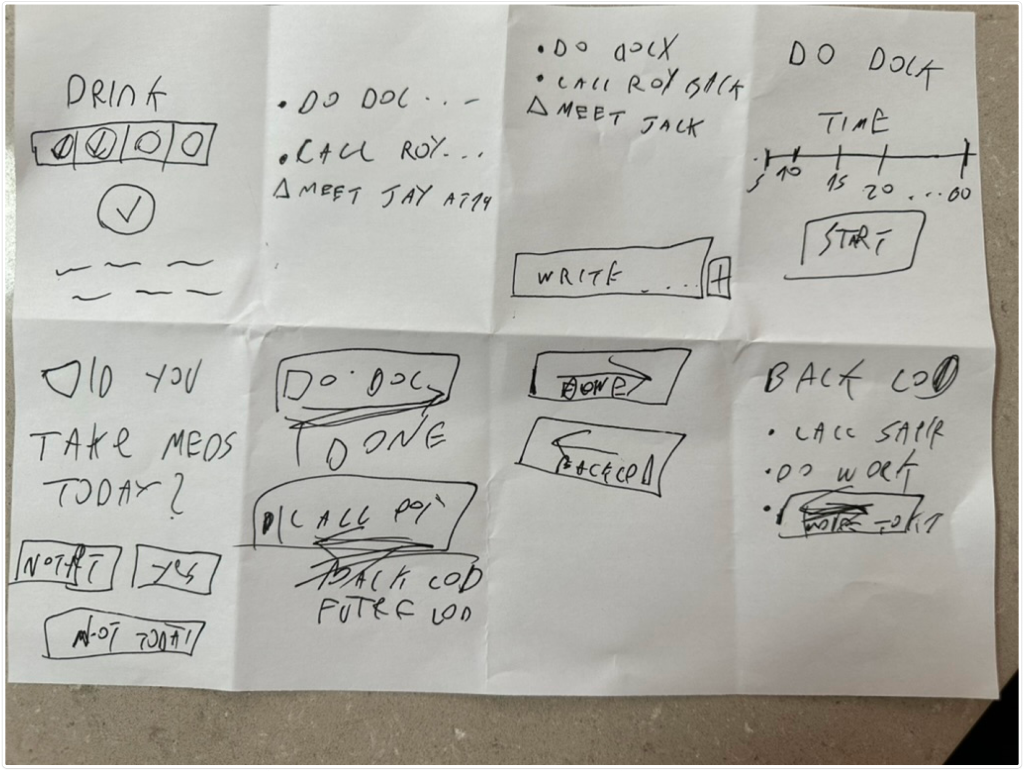
Exploring Early Concepts Through Crazy 8's
The design process began with a Crazy 8 exercise to rapidly generate diverse ideas for the app’s core experience. This was followed by quick, low-fidelity wireframes to visualize key flows and layout possibilities. These early sketches were intentionally rough—serving as a tool for ideation, evaluation, and iteration before committing to high-fidelity screens.
The Final Design